Most onboarding sequences are calendars. Day 1 welcome, day 3 feature tour, day 5 case study, day 7 “need any help?”. The person who set everything up in an hour gets nagged about steps they finished on Monday. The person who never installed anything gets a case study about a feature they have never seen. The calendar does not know, because the calendar is not listening.
Our situation
We will use GetFluxly as the example, because this is the sequence we run on ourselves.
GetFluxly sends lifecycle email based on product events. A new signup gets real value at one precise moment: when their first automation sends its first email to one of their own users. Everything before that is setup. Between signup and that moment sit three steps: install the SDK and see a first event arrive, watch profiles appear, switch on one automation.
People who reach the first automated send almost always stay. People stuck before the first event usually never log in again. So our onboarding has exactly one goal, and it is not “engagement.” It is the first automated send.
What to track
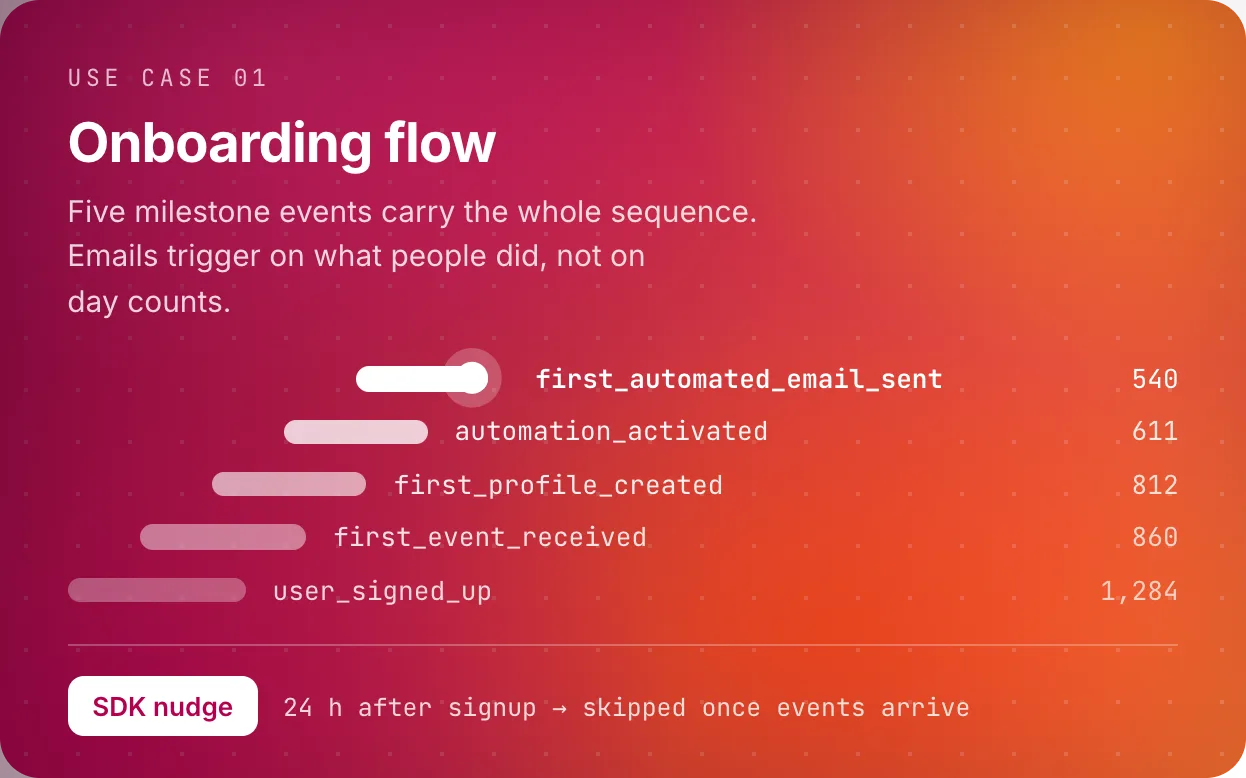
Five backend events carry the whole sequence:
-
user_signed_up -
first_event_received, fired server side the first time an event lands for a project -
first_profile_created, the moment their data starts looking like people -
automation_activated -
first_automated_email_sent, the win
Fire milestone events from the backend, not the client. first_event_received
is derived at ingest, so it stays true even if the user never opens your app again.
Triggers, conditions, and the rules we took
Every email is either triggered by progress or gated on the lack of it.
-
On
user_signed_up: welcome, immediately. One job, one link, the install snippet. No feature tour. -
24 hours after signup: SDK nudge. Condition:
first_event_receivedhas not fired. If it has, this email never sends. -
On
first_event_received: “your data is live,” sent the moment it happens. Celebrates the step, then points at exactly one next action, turning on an automation. -
Day 3: automation nudge. Condition: events are flowing but
automation_activatedhas not fired. -
On
first_automated_email_sent: milestone email. Congratulate, then point at the next layer (segments, a second automation).
The whole design fits in one sentence: never nudge someone about a step they already finished, and never stay silent when they finish one.
The timeline
Five emails maximum, and most people receive three.
The emails
1. Welcome (on signup, everyone)
 GetFluxly hello@getfluxly.com
 Your GetFluxly project is ready
Hi {{first_name}},
Your project is live. One thing stands between you and your first automated email: the install snippet.
Paste it, deploy, and events start flowing in about a minute.
Get the snippetReply if anything fights back. A human reads these.
2. SDK nudge (24h, only if no events yet)
GetFluxly hello@getfluxly.com Your project has not seen an event yet
Hi {{first_name}},
You signed up yesterday but no events have arrived, which usually means the snippet is not deployed yet, or it is on the wrong domain.
Here is the snippet again, plus the three most common fixes:
Install guideStuck on something weirder? Reply with your stack and I will look.
3. Milestone (on first automated send)
GetFluxly hello@getfluxly.com Your first automated email just went out
Hi {{first_name}},
An automation you built just emailed one of your users. From here it runs on its own.
Next thing worth ten minutes: a segment for users going quiet, so your second automation can catch them early.
Build the quiet segmentSetting it up
- Define the first win for your product. One event, not a score.
- Instrument the milestone events server side.
- Give every timed email an exit condition and every milestone an immediate email.
- Cap the sequence. If five emails did not get them there, a sixth will not.
- Watch where people stall. The step with the biggest drop is your real onboarding problem, and no email fixes a product gap.